

Saturday, June 30, 2012
FVM at the ELO conference in W.V.
Dene Grigar recently presented a paper on her work with the Fort Vancouver Mobile project at the 2012 Electronic Literature Organization conference in Morgantown, W.V., the site of West Virginia University. This photo shows Grigar during her talk, playing a video featuring Fort Vancouver's chief ranger Greg Shine.


Tuesday, June 12, 2012
Coverage of the regional mobile app market
Dene Grigar and I were the only educators at this recent mobile technology forum in Portland, featuring senators Maria Cantwell and Ron Wyden, and including a presentation by us. This is how The Oregonian covered it.
The Columbian, with a follow-up cheer
The Vancouver Business Journal
And a few pics here from ISITE Design
The Columbian, with a follow-up cheer
The Vancouver Business Journal
And a few pics here from ISITE Design
FVM at DHSI 2012
The Fort Vancouver Mobile project was featured prominently in discussions last week at the Digital Humanities Summer Institute in Victoria, British Columbia, where Creative Media and Digital Culture faculty (Dene Grigar, John Barber, Will Luers, Brett
Oppegaard and Nicholas Schiller) taught a week-long course called “Creating Digital Humanities Projects for the Mobile
Environment.” The international group of scholars taking this course -- from such universities
as Yale, Emory, Howard, Michigan, and Toronto -- learned about conceptualizing
space, coding and programming, and developing mobile architecture, design and
content. The proof-of-concept apps produced included programs for special
library collections, literary walks, and teaching foreign languages.
Saturday, June 9, 2012
FVM app public launch: June 9, 2012
Just a quick post to commemorate the official launch of the Fort Vancouver Mobile app today. More than two years in the making, this app has brought together the talents and efforts of more than 100 people, and it was a great joy to see all of those using and having fun (and learning) with the app today. This is a major milestone moment for FVM. So I want to pause for a second to thank everyone who made it happen! I feel enormous gratitude toward each and every one of you! Special thanks are due to: Dene Grigar, Greg Shine, Joe Oppegaard, Brady Berkenmeier, Troy Wayrynen, Marsha Matta, Forrest Burger, Deva Yamashiro, Kapuanani Antonio, Fred Kemp, Tracy Fortmann and all of the Fort Vancouver staff. ... Additional recognition should be extended as well to Berkenmeier, director of the "Kane's Wanderings" module, for his continued commitment and advancement of the app. Besides the Kane piece, the "Kanaka" module also was a part of this launch. In addition, we gave out about 200 cards with installation instructions today, so I will look forward to checking analytics and viewing this day from behind the scenes as well, to get a better sense of the push we made. Will keep you posted on what we learn from today. ...
Tuesday, May 29, 2012
ICA presentation on FVM project
I just returned from an exciting International Communication Association conference in Phoenix, Ariz., which featured a two-day preconference focused specifically on Mobile Communication, Community, and Locative Media.
At that preconference, which had representatives from 16 different countries in attendance, I had the honor of presenting a talk titled "Looking into the Past to See Our Future: Mobile Devices as Dynamic Historical Interpretation Tools." My goal was to express the idea that mobile communication does not have to carry the bags of old media with it. We can look at the mobile medium with fresh eyes and see it as something with new affordances and new possibilities, including its potential for historical interpretation and journalism (the second part being my emphasis for a project this summer). The talk went well. Many people expressed interest in those ideas and the Fort Vancouver project. The momentum continues to build!
Friday, May 18, 2012
Fort Vancouver Mobile's public launch coming up: June 9
WSU Vancouver's version ...
Here's the press release:
Here's the press release:
Contact:
Brett Oppegaard, project coordinator
fortvancouvermobile@gmail.com
360-521-8150 (c)
Behind-the-scenes blog: www.FortVancouverMobile.net
May 18, 2012
Want to learn about history at the
Fort Vancouver National Historic Site in a new way? There’s an app for that, as
the Fort Vancouver Mobile app will make its public debut on June 9, in
conjunction with a Brigade Encampment as well as National Get Outdoors Day.
The free
app -- funded by grants from the National Endowment for the Humanities, the
Clark County Commissioners, and Washington State University Vancouver – is the
first interpretation-oriented app in the National Park Service system. This
research project has been developed by a core of about 20 scholars, many in The
Creative Media and Digital Culture program at WSU Vancouver, with the support
of students as well as new media professionals in the region and bolstered by
the volunteer efforts of more than 100 people throughout the community. WSU
Vancouver faculty member Brett Oppegaard is coordinating the project, and
fellow faculty members Dene Grigar, John Barber, Will Luers, Michael Rabby,
Sola Adesope, and Steve Fountain all have contributed to the project.
While many
apps provide textbook-like information about people or places in history, or
connect users to wayfinding tools, the Fort Vancouver Mobile app distinctly is
designed as an interface for narrative immersion into a historical place. Those
who download the app (through the Android or Apple markets) will have access to
interactive stories connected to physical landmarks, which help to create a
synthesis of the digital and the physical at Fort Vancouver.
On June 9,
the focus of the festivities will be on the debut of the first two modules
created for the app:
· “Kanaka”
– About the native Hawaiians, or “kanakas,” who began coming to Fort Vancouver
in the 1820s to serve as laborers. Many toiled in the sawmill, but others, such
as the protagonists of this story, pastor William Kaulehlehe and wife, Mary
Kaai, were drawn to this place for other reasons. Created in partnership with
the Ke Kukui Foundation.
· “Kane’s
Wanderings,” about Irish-born painter Paul Kane, who stopped at Fort Vancouver in
the winter of 1846-1847, in the midst of traveling and documenting the people
and places of the Pacific Northwest. Created as part of a WSU Vancouver class
on Digital Storytelling.
Other modules, such as a story focused on gender and women’s
issues, will be released at later special events. A behind-the-scenes blog on
the project is being kept at: FortVancouverMobile.net.
The Fort Vancouver
National Historic Site, which attracts more than 1 million annual visitors to
its Vancouver, Wash., campus, has been seeking out younger patrons
through various pioneering approaches to historical interpretation, including
podcasting, digital archiving and social media feeds. The Fort Vancouver Mobile
team, including Chief Ranger Greg Shine, was assembled in response to the
potential offered by mobile devices, such as iPhones and Droids. Through investigations
into the affordances of these integrated media devices, clips of audio, video,
animation, and text, have been mixed to be delivered to visitors at the most
ideal times in the most ideal places at the site to generate a sense of Fort
Vancouver’s story.
The Fort Vancouver National
Historic Site, 1001 E. Fifth St., Vancouver, Wash., will offer the Brigade
Encampment and related activities, including the app launch, from 10 a.m. to 4
p.m. June 9. Admission to the event is free, and download cost of the app is
free.
For more information about the
Fort Vancouver Mobile project, please contact: Brett Oppegaard, 360-521-8150, fortvancouvermobile@gmail.com.
Fort Vancouver Mobile project earns a Research Mini-Grant from WSU Vancouver
WSU Vancouver announced this week that the Fort Vancouver Mobile project has earned a $4,000 Research Mini-Grant to extend its investigations of place-based media into journalistic realms. This grant primarily will be used to buy equipment for producing new media and conducting research on the site, while a new accompanying app will be built to look at labor issues over the past 200 years at the old sawmill site near Fort Vancouver. More details about this effort will be posted later in the summer.
Wednesday, May 16, 2012
Redesign: News of the Era
The primary protagonist of the Kanaka module, William Kaulehelehe, wrote a letter to his hometown newspaper, The Ka Nupepa Kuokoa, in the 1860s, basically complaining that he wasn't receiving the copies he had paid for, and he wanted those. As a former newspaper writer, I found that complaint to transcend time, and I looked closer at when those letters were being sent. One of them was dated April 1865, the same month that General Lee surrendered at Appomattox, the Civil War ended, Lincoln was assassinated, Booth was on the loose, and the S.S. Sultana sunk, which is the worst marine disaster in U.S. history. No wonder William wanted to know what was going on! ... In that time period, the newspaper was print, television, radio, and Internet bundled into a single and slow analog delivery system. Without a newspaper, everything was word of mouth, and news could take months to travel across the country. So we decided to make an alternate reality game of sorts out of this, by embedding summaries of period newspapers in the landscape at Fort Vancouver and asking visitors to walk around the site to find different issues (or the lost Kaulehelehe newspapers, as we dubbed them).
Here is the version of this newspaper imagery we will launch with on June 9, showing an account of the first "base ball" game happening in the 1840s; Fort Vancouver took up the craze soon thereafter:

We also created newspapers for other major national events, such as Lincoln's assassination (with text placed on those images within the app):


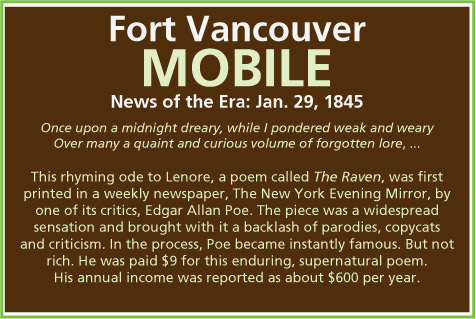
And the interesting moment in time in which literature arose through newspaper printings, such as Poe's The Raven, which first was produced in a newspaper:


At the end of each newspaper sequence, users get to take a quiz, to test either explicit knowledge transfer or to find out what users found most interesting about the newspaper summary. These newspaper sequences did begin as digital collages, but gradually grew into the more even and sophisticated designs above. Here are a couple of examples of the starting points:


Redesign: Twitta-graphs, or whatever they are ...
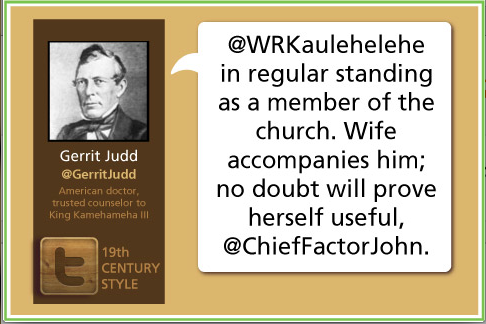
Letters, journal entries, and other historical documents from the mid-1800s have been converted through this app into timely dispatches, like social media streams, to represent the words as well as the spirit of period communication. While the idea seems simple, the creation of such a stream has been challenging in many ways. Here is the look of the Twitta-graph (a Twitter-Telegraph combo) at the end of the development cycle, with designer Marsha Matta's vision applied:

The previous version was more colorful, but we were trying to create a thematic look that could be carried throughout the app. This version was primarily designed by me (Brett Oppegaard), with help from Kapuanani Antonio. Part of the skimming of the colors was part of the evening out of the overall app design. Also, of course, we transformed the app from a horizontal view to a vertical view, to match the look of other National Park Service apps. Here was the previous version:

The version before that:

The version before that:

As you can see, at the beginning, I didn't even know the right size to make the box or how to format the text (forget about higher-end aesthetics). But each design has to start somewhere, and this image is the first of the slides created:

So the essence of the idea was to create Twitter handles for historical characters (and there really are these handles on Twitter; although we haven't done anything else with them yet). And to give them a profile, per the text underneath the handle, and then, to let them speak, pretty much as they did in the historical documents, but using hashtags and @handles and other contemporary conventions through that specific social media stream. We had hoped to give them a modern voice, but, as our research turned up, combining old English and Twitter-jargon does not necessarily generate clarity. In fact, it created a double-whammy of confusion for many of our test subjects, either thrown off by one or the other. The newest design, we hope, will help to address such confusion. ... We will be testing that more this summer.

The previous version was more colorful, but we were trying to create a thematic look that could be carried throughout the app. This version was primarily designed by me (Brett Oppegaard), with help from Kapuanani Antonio. Part of the skimming of the colors was part of the evening out of the overall app design. Also, of course, we transformed the app from a horizontal view to a vertical view, to match the look of other National Park Service apps. Here was the previous version:
The version before that:

The version before that:

As you can see, at the beginning, I didn't even know the right size to make the box or how to format the text (forget about higher-end aesthetics). But each design has to start somewhere, and this image is the first of the slides created:

So the essence of the idea was to create Twitter handles for historical characters (and there really are these handles on Twitter; although we haven't done anything else with them yet). And to give them a profile, per the text underneath the handle, and then, to let them speak, pretty much as they did in the historical documents, but using hashtags and @handles and other contemporary conventions through that specific social media stream. We had hoped to give them a modern voice, but, as our research turned up, combining old English and Twitter-jargon does not necessarily generate clarity. In fact, it created a double-whammy of confusion for many of our test subjects, either thrown off by one or the other. The newest design, we hope, will help to address such confusion. ... We will be testing that more this summer.
Sunday, May 6, 2012
Redesign: The launcher icon ... launched
We recently wrapped up the redesign of the launcher icon. From the start, we wanted to match the style and look of the National Park Service's Capitol Mall app. We also wanted to, in the spirit of the interpretive nature of the app, to have a metaphorical layer to the image. The gate of the palisade, elaborated upon in earlier discussions on this blog, ended up becoming our symbol. Designer Marsha Matta created the work and then had to size it for the various devices that could access it (that's a much longer story). But, in the end, I think you can see the continuity of the look, with this Fort Vancouver version comparing well to the original:
 One note about the text underneath the launcher icon; on the Android home screen, the text is abbreviated, but on the interior screens, at least on Android, the text is presented in full as "Fort Vancouver."
Another interesting quirk here. Android devices for some reason do not allow screenshots (or at least not without a lot of external work), so I shot this image with my iPhone, then cropped it with Photoshop.
One note about the text underneath the launcher icon; on the Android home screen, the text is abbreviated, but on the interior screens, at least on Android, the text is presented in full as "Fort Vancouver."
Another interesting quirk here. Android devices for some reason do not allow screenshots (or at least not without a lot of external work), so I shot this image with my iPhone, then cropped it with Photoshop.

Monday, April 30, 2012
Redesign: Making our own menu bar
One of the most fun parts of creating a new kind of app is to imagine from scratch the different ways people might use the program, and, therefore, what virtual tools they might need. During this process, we quickly discovered that a standardized menu bar would not work, so we created our own, including icons for our various paths (a footstep theme that leads users from story to story), a map (that helps users geolocate), and the Haversack (the backpack-like item in which visitors use to gather their media goods).

 You might notice that five buttons were not enough for what we wanted to do, so we made a More and a Less button, to allow users to open up the different tool bar belts. ... Also, parts of the app have different buttons that appear in different places, depending on the needs of the moment, which is another way to customize the interface for the user.


Redesign: Pushing videos through YouTube / Vimeo
Instead of hosting videos directly on our servers, and then processing those in various ways, depending on the device, as we have been doing, we thought it would be more efficient and more effective to put those videos on YouTube and Vimeo and let them do that part of the work. Amazingly enough, though, YouTube and Android, both of which Google owns, have some compatibility issues. We are not sure if those will be resolved before the June 9 launch. So we might be back to the original plan of hosting the videos ourselves, at least with the Android version of the app (the Apple iPhone version seems to work fine). Regardless, the video content of the Kanaka, Kane and Village Opening modules now are posted on both YouTube and Vimeo, in case you want to take a look at examples of that part of the app design.
Tuesday, April 24, 2012
Redesign: Pick your path screen
One more segment of the redesign to post about today: After pressing the "pick your path" text or menu button, app users will be directed to the following screen, which has a bar of buttons on the right-hand side that scrolls up and down, allowing users to pick various interactive stories:

Only our historical review of the background image above (led by Chief Ranger Greg Shine) turned up some concerns. The scene does show a representation of Fort Vancouver, and is meant to be a historic Fort Vancouver scene, but the Native Americans in the foreground of the image are Plains Indians, not Coastal Indians, which raised red flags with the historians about the integrity of the image. In addition, the encroaching of the forest on the fort also is historically inaccurate. So we changed the background to the following, listed by the Yale Collection of Western Americana, Beinecke Rare Book and Manuscript Library, as by "Lieutenant Warre. Paintings described by Mr. C. P. Wilson in an article “Early Western Paintings” which appeared in The Beaver, June 1949 (no. 280)."

The fort's Chief Ranger Greg Shine said that painting's authorship also is in question (another long post could be made about that discussion), but the public domain image itself passes the visual standards we needed to meet. So it will be used instead.

Only our historical review of the background image above (led by Chief Ranger Greg Shine) turned up some concerns. The scene does show a representation of Fort Vancouver, and is meant to be a historic Fort Vancouver scene, but the Native Americans in the foreground of the image are Plains Indians, not Coastal Indians, which raised red flags with the historians about the integrity of the image. In addition, the encroaching of the forest on the fort also is historically inaccurate. So we changed the background to the following, listed by the Yale Collection of Western Americana, Beinecke Rare Book and Manuscript Library, as by "Lieutenant Warre. Paintings described by Mr. C. P. Wilson in an article “Early Western Paintings” which appeared in The Beaver, June 1949 (no. 280)."

The fort's Chief Ranger Greg Shine said that painting's authorship also is in question (another long post could be made about that discussion), but the public domain image itself passes the visual standards we needed to meet. So it will be used instead.
Redesign: Opening screen
One really interesting quirk in this kind of app design, which we only discovered through building and testing, was that users of the FVM app onsite were looking for a much different experience than users of the app offsite, and, surprisingly, a large number of our users were offsite when they accessed this app. This could be people trying out the app at home, before coming to the park, or it could be people looking for historical resources, or it could be people interested in National Park Service apps, or who knows what. ...
As designers interested in knowing more about place-based media, we always just envisioned the app as an onsite resource. But the user patterns indicated secondary and tertiary uses as well, which we felt we needed to address somehow. We did not want to try to make a Swiss Army knife of apps, trying to please everybody, all of the time (and in the process pleasing no one). This FVM app is a research tool for learning more about net locality, or place-based media, but for offsite users, that approach would not mean anything to them. So we decided to use GPS triggering to determine where users were, in relation to the Fort Vancouver National Historic Site, and, if they were not in the near vicinity, we made an animated sequence that encouraged visitors to come to the site by hyperlinking the fort's address (to Google maps), the fort's web site, and even activating the phone number, so if an offsite user touched the number, that person would be put in contact directly with a park ranger. The final screen of the animation looks like this (for the rest of it, you'll have to download the app after June 9, 2012):

Those who are onsite when they open the app (or move onsite with the app open) are welcomed with a much more complicated animation, that you just have to see in motion to appreciate. It starts with the gate opening and ends with the following screen, encouraging users to select one of the various interactive stories to experience (through the menu bar below this image, or by pressing the path text):


Those who are onsite when they open the app (or move onsite with the app open) are welcomed with a much more complicated animation, that you just have to see in motion to appreciate. It starts with the gate opening and ends with the following screen, encouraging users to select one of the various interactive stories to experience (through the menu bar below this image, or by pressing the path text):

Redesign: Launcher icon
Of all the redesign issues we faced during the past several months, the launcher icon, in hindsight, seemed to be the lynchpin decision. I don't know if that is because the icon is the first image that users of the app see, or if that icon is the toughest to design, because of its small size, or if we focused all of our design reservations, frustrations and concerns onto that thumbprint-sized scapegoat. Whatever the deeper meanings might be, we had to have a launcher icon, for people to press and open the app. So, after various prototypes and discussions, lead designer Marsha Matta eventually developed the image of the Fort Vancouver palisade as a metaphorical barrier between the physical world and the digital world, with the gate of Fort Vancouver, represented in the gate image of the app, opening up exciting new worlds to visitors, if the just press this (the text on the mobile device, underneath this icon, will read: Fort Vancouver):


Monday, April 23, 2012
"Fort Vancouver: A National Treasure" editorial by Tracy Fortmann
Fort Vancouver National Historic Site's superintendent Tracy Fortmann wrote an editorial in The Columbian this weekend that mentioned our work on mobile historical interpretation, as part of what makes the place special on a national scale.
Thursday, April 12, 2012
A bit of added media ...
In setting up the FVM YouTube channel, I ran across a couple of pieces of media on the FVM project that I don't think I've posted before. So here those are, too:
Brady Berkenmeier's senior seminar presentation on his FVM module, Kane's Wanderings, in 2011
WSU News coverage of the app (notice the classic G1 phone in use at the time of filming)
And a couple of Hastac posts:
About the iDMAa presentation
And about Dr. Dene Grigar's NEH presentation
Brady Berkenmeier's senior seminar presentation on his FVM module, Kane's Wanderings, in 2011
WSU News coverage of the app (notice the classic G1 phone in use at the time of filming)
And a couple of Hastac posts:
About the iDMAa presentation
And about Dr. Dene Grigar's NEH presentation
YouTube and Vimeo channels are up
This blog now featured on the official Fort Vancouver web site
When the Fort Vancouver National Historic Site updated its social media links recently, this Fort Vancouver Mobile blog was added to the list, which also includes the site's newsletter and its channels on Facebook, Twitter, Flickr, etc. ... Thanks again for the support, Fort Vancouver!
Tuesday, March 27, 2012
CCCCs, Research Network Forum
As we continue to spread the word about the Fort Vancouver Mobile project around the country, I (Brett) was in St. Louis, Mo., last week, giving a presentation on aspects of this project at the Conference on College Composition and Communication. This conference, which attracts about 3,000 people, also offered a Research Network Forum, in which I was able to serve as discussion leader for two sessions, while also talking about the FVM project in depth to a variety of interested parties informally as well. In short, the trip was a great success, and many more people learned about the project, including some of you who might be reading this now. For those newcomers, welcome, and please let me know if you have any other questions.
Next round of FVM app slides
Lead designer Marsha Matta has created the next round of slides to consider for the launch of the FVM app in June. ... Here are the images, with issues for discussions raised below.
Typography:
We have been using typography embedded on images, which looks fine, but that approach does not allow for ADA accessibility, because the web page readers cannot determine what on the image is text and what is not. So our plan is to place the text separately on the images, through HTML, which the readers can pick up. Yet that creates a new problem, of which font to use. Here is a list of all of the universal fonts that most machines can translate directly. None of them are particularly attractive. In earlier versions, we have tested a variety of sans-serif fonts (because those are easier to read at smaller sizes), including Tahoma, Arial and Trebuchet. Here is a look at Helvetica and Georgia (a serifed font):


Of all of the versions we have seen (thanks for your patience, Marsha!), I think Helvetica looks like the best fit. Anyone disagree? Comments? ...
Launcher icon:
We continue to refine the launcher icon ideas, going from the bastion and outside views, to the more metaphoric idea of the palisade and gate as a portal through which visitors will walk.


I'm thinking that the launcher icon should lead to the opening screen, which are developing below. ... I have mixed feelings about the open gate versus the closed gate. I like the idea of an open gate as welcoming, but I also like the closed gate image as something that needs to be opened and stepped through, so that's the place in which I lean at this moment. Thoughts?
Opening screens:
Although we only show a static image below, these opening screens actually are quick animations of the gate swinging open, with other details in movement as well. I really like the textures and colors that Marsha has developed in these images over time. What do you think of them?


Kanaka module:
New images developing the look of the Kanaka module


Kane module:
Alternative opening screens for the Kane module


New Twitter-like screen alternatives:
Again, a typography question ...


And one other integral screen under development, to show prompts:

Comments on any of these are encouraged and appreciated. Just post below.
Typography:
We have been using typography embedded on images, which looks fine, but that approach does not allow for ADA accessibility, because the web page readers cannot determine what on the image is text and what is not. So our plan is to place the text separately on the images, through HTML, which the readers can pick up. Yet that creates a new problem, of which font to use. Here is a list of all of the universal fonts that most machines can translate directly. None of them are particularly attractive. In earlier versions, we have tested a variety of sans-serif fonts (because those are easier to read at smaller sizes), including Tahoma, Arial and Trebuchet. Here is a look at Helvetica and Georgia (a serifed font):


Of all of the versions we have seen (thanks for your patience, Marsha!), I think Helvetica looks like the best fit. Anyone disagree? Comments? ...
Launcher icon:
We continue to refine the launcher icon ideas, going from the bastion and outside views, to the more metaphoric idea of the palisade and gate as a portal through which visitors will walk.


I'm thinking that the launcher icon should lead to the opening screen, which are developing below. ... I have mixed feelings about the open gate versus the closed gate. I like the idea of an open gate as welcoming, but I also like the closed gate image as something that needs to be opened and stepped through, so that's the place in which I lean at this moment. Thoughts?
Opening screens:
Although we only show a static image below, these opening screens actually are quick animations of the gate swinging open, with other details in movement as well. I really like the textures and colors that Marsha has developed in these images over time. What do you think of them?


Kanaka module:
New images developing the look of the Kanaka module


Kane module:
Alternative opening screens for the Kane module


New Twitter-like screen alternatives:
Again, a typography question ...


And one other integral screen under development, to show prompts:

Comments on any of these are encouraged and appreciated. Just post below.
Friday, March 23, 2012
XID plant identification app on the market
FVM content partner Dr. Richard Old recently released his independent plant identification app XID (Expert Identification System) in Google Play (formerly known as Android Market; have to say, by the way, that I like the Android Market name better). ... Anyway, our goal in working together is to eventually bring a Fort Vancouver version of this system to the site, maybe integrated into a gaming format, that helps visitors to learn of the flora in the region in fun and engaging ways. Richard is off to a great start with XID. Congratulations!
Tuesday, March 20, 2012
More draft screen shots
More draft screen shots by Marsha Matta:
These three are part of animations, splitting the initial experience into two main paths (one for people at the site and one for people away from the site; for those away from the site, the gates don't open, so those users see that they cannot reach the geolocated media gold, but they still can use the menu buttons to reach off-site material, or the haversack; we are calling this section of the app the FVM geo-fork):


The Tobiason turntable is reached through the "paths" button, in which swiping screens lead to different modules, one of which is the Kanaka (or native Hawaiian) module. Here is the opening path screen, the Kanaka turntable screen and a mock Kanaka search screen (showing users how to reach the next point of geo-gold):


Marsha also sent over these suggested tool bars for the bottom section of the app:


Comments, feedback, ideas, criticisms? What do you think of these?
These three are part of animations, splitting the initial experience into two main paths (one for people at the site and one for people away from the site; for those away from the site, the gates don't open, so those users see that they cannot reach the geolocated media gold, but they still can use the menu buttons to reach off-site material, or the haversack; we are calling this section of the app the FVM geo-fork):


The Tobiason turntable is reached through the "paths" button, in which swiping screens lead to different modules, one of which is the Kanaka (or native Hawaiian) module. Here is the opening path screen, the Kanaka turntable screen and a mock Kanaka search screen (showing users how to reach the next point of geo-gold):


Marsha also sent over these suggested tool bars for the bottom section of the app:


Comments, feedback, ideas, criticisms? What do you think of these?
Next iteration of the launcher icon ...
We like the way the Fort Vancouver palisade and gate could symbolically open up the app to visitors, so lead multimedia designer Marsha Matta has created this array of potential launcher icons. What do you think?


Subscribe to:
Posts (Atom)